Start with the whole portfolio
See your total value and how it is spread across your assets.

The Bundil app for desktop
Bundil Wallet brings crypto roundups, portfolio tracking, and self-custody for Bitcoin, Ethereum, and Litecoin into one focused app.
See what you hold, stay in control of how you accumulate, and choose the desktop build that fits your system.
Available for Windows, macOS, and Linux.
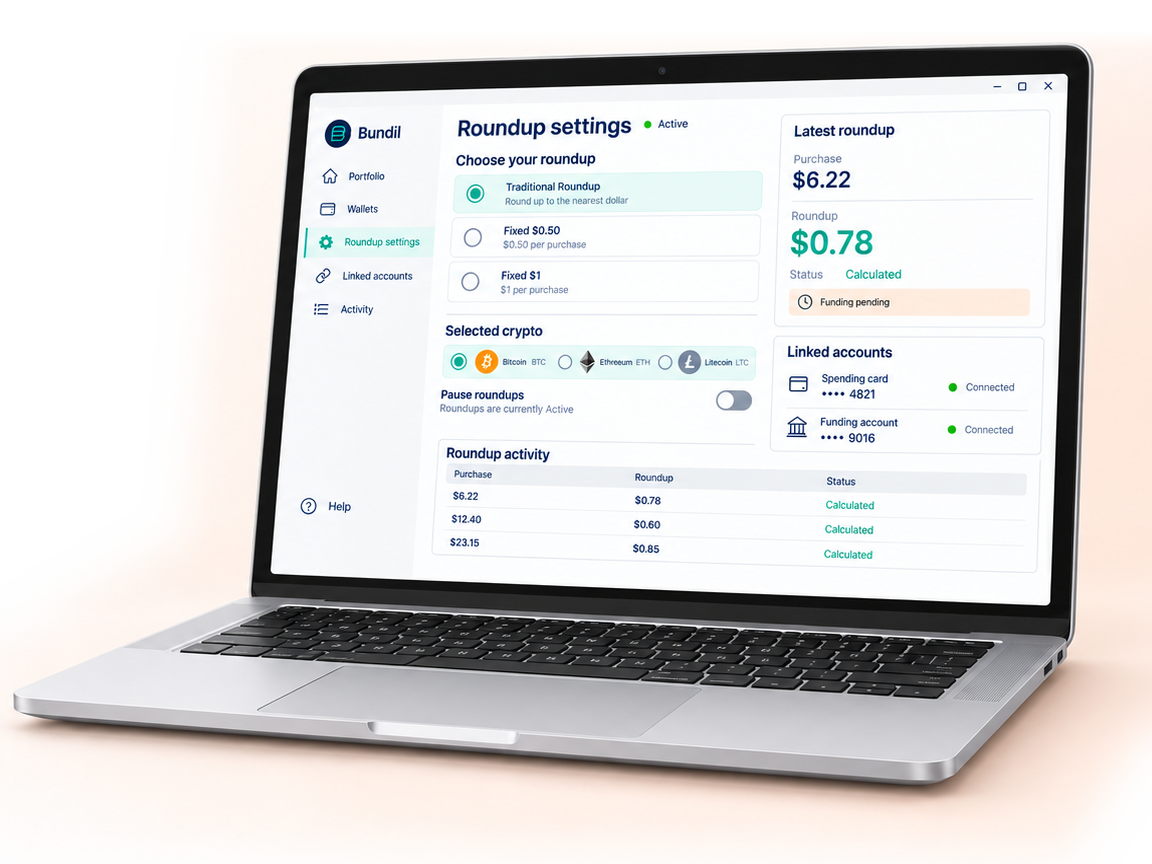
A $6.22 purchase creates a $0.78 crypto roundup when you choose Traditional Roundup.
Prefer a consistent amount? Choose a fixed $0.50 or $1 roundup for each connected-card purchase. Bundil records the activity toward your selected crypto, while you keep the option to pause or change the rule.
Roundups use your connected funding setup. Self-custody wallet keys are controlled separately inside Bundil Wallet.
Bundil Wallet brings your holdings, prices and activity into a desktop portfolio view you can read at a glance.

See your total value and how it is spread across your assets.
Check its current price, change the chart timeframe and follow the coins on your watchlist.
Review activity alongside your holdings to distinguish contributions and transfers from market price changes.
Manage your crypto wallets and the accounts behind your roundups from the Bundil app.
Create or import a self-custody wallet for Bitcoin, Ethereum or Litecoin. Receive and send BTC, ETH or LTC with keys you control.
Set your roundup mode and selected crypto, then pause or resume new roundups as your plans change.
Review linked cards, your funding account and connection status. Follow roundup activity and wallet transactions in their respective histories.
Your funding account supplies roundup contributions. Your self-custody wallets use your own keys. Both are managed in Bundil Wallet, with separate controls and activity.
Choose Bundil Wallet for Windows, macOS or Linux.
Connect your accounts for roundups, create or import a
supported wallet, or use both.
Check your portfolio and recent activity, then make any changes you need for the day ahead.
Bundil appeared on Shark Tank. View the ABC listing.
Choose your operating system to get started.
Release information: App version 12.04 Latest patch 12.04.b
No. The self-custody wallet feature and roundup funding are separate. You can create or import a supported wallet without connecting a funding account. Roundups need a connected card and funding setup.
Bundil Wallet supports Bitcoin (BTC), Ethereum (ETH) and Litecoin (LTC) in its self-custody wallets. Check the asset and network before sending or receiving. Support for ETH does not mean support for every token on Ethereum.
You are responsible for keeping the recovery information provided during wallet setup. Bundil cannot restore a self-custody wallet without it. Never share private keys or recovery information with anyone claiming to offer support.
A calculated roundup is a contribution recorded against your connected funding setup. It does not, by itself, confirm a transfer to a self-custody address. Check the relevant activity status to see what has been funded or transferred.
Pausing stops new roundups from being added. It does not reverse a contribution already initiated or move assets out of a wallet. Resume when you are ready to start adding roundups again.
No. Charts show price history and portfolio information. Crypto prices can fall as well as rise, and adding contributions does not guarantee a profit. A displayed market price is not a guaranteed transaction price.
Review the fees and any provider terms shown before enabling a funded service or confirming a transaction. Network costs and service charges can affect the amount you receive.
For help with an account or connection, open Help in the Bundil app. Never share your private keys, recovery information or bank login details with support.